

More pypsa features: more complex dispatch problems#
Note
If you have not yet set up Python on your computer, you can execute this tutorial in your browser via Google Colab. Click on the rocket in the top right corner and launch “Colab”. If that doesn’t work download the .ipynb file and import it in Google Colab.
Then install the following packages by executing the following command in a Jupyter cell at the top of the notebook.
!pip install pypsa matplotlib cartopy highspy
Note
These optimisation problems are adapted from the Data Science for Energy System Modelling course developed by Fabian Neumann at TU Berlin.
(Repeting) basic components#
Component |
Description |
|---|---|
Container for all components. |
|
Node where components attach. |
|
Energy carrier or technology (e.g. electricity, hydrogen, gas, coal, oil, biomass, on-/offshore wind, solar). Can track properties such as specific carbon dioxide emissions or nice names and colors for plots. |
|
Energy consumer (e.g. electricity demand). |
|
Generator (e.g. power plant, wind turbine, PV panel). |
|
Power distribution and transmission lines (overhead and cables). |
|
Links connect two buses with controllable energy flow, direction-control and losses. They can be used to model:
|
|
Storage with fixed nominal energy-to-power ratio. |
|
Storage with separately extendable energy capacity. |
|
Constraints affecting many components at once, such as emission limits. |
Let’s consider a more general form of an electricity dispatch problem#
For an hourly electricity market dispatch simulation, PyPSA will solve an optimisation problem that looks like this
such that
Decision variables:
\(g_{i,s,t}\) is the generator dispatch at bus \(i\), technology \(s\), time step \(t\),
\(f_{\ell,t}\) is the power flow in line \(\ell\),
\(g_{i,r,t,\text{dis-/charge}}\) denotes the charge and discharge of storage unit \(r\) at bus \(i\) and time step \(t\),
\(e_{i,r,t}\) is the state of charge of storage \(r\) at bus \(i\) and time step \(t\).
Parameters:
\(o_{i,s}\) is the marginal generation cost of technology \(s\) at bus \(i\),
\(x_\ell\) is the reactance of transmission line \(\ell\),
\(K_{i\ell}\) is the incidence matrix,
\(C_{\ell c}\) is the cycle matrix,
\(G_{i,s}\) is the nominal capacity of the generator of technology \(s\) at bus \(i\),
\(F_{\ell}\) is the rating of the transmission line \(\ell\),
\(E_{i,r}\) is the energy capacity of storage \(r\) at bus \(i\),
\(\eta^{0/1/2}_{i,r,t}\) denote the standing (0), charging (1), and discharging (2) efficiencies.
Note
Per unit values of voltage and impedance are used internally for network calculations. It is assumed internally that the base power is 1 MW.
Note
For a full reference to the optimisation problem description, see https://pypsa.readthedocs.io/en/latest/optimal_power_flow.html
South Africa & Mozambique system example#
Compared to the previous example, we will consider a more complex system with more components (generators, transmission lines) and more buses. We also discuss basics of the plotting functionality built into PyPSA.
fuel costs in € / MWh\(_{th}\)
fuel_cost = dict(
    coal=8,
    gas=100,
    oil=48,
)
efficiencies of thermal power plants in MWh\(_{el}\) / MWh\(_{th}\)
efficiency = dict(
    coal=0.33,
    gas=0.58,
    oil=0.35,
)
specific emissions in t\(_{CO_2}\) / MWh\(_{th}\)
# t/MWh thermal
emissions = dict(
    coal=0.34,
    gas=0.2,
    oil=0.26,
    hydro=0,
    wind=0,
)
power plant capacities in MW
power_plants = {
    "SA": {"coal": 35000, "wind": 3000, "gas": 8000, "oil": 2000},
    "MZ": {"hydro": 1200},
}
electrical load in MW
loads = {
    "SA": 42000,
    "MZ": 650,
}
Building a basic network#
By convention, PyPSA is imported without an alias:
import pypsa
First, we create a new network object which serves as the overall container for all components.
n = pypsa.Network()
n.add("Bus", "SA", y=-30.5, x=25, v_nom=380, carrier="AC")
n.add("Bus", "MZ", y=-18.5, x=35.5, v_nom=380, carrier="AC")
n.buses
| v_nom | type | x | y | carrier | unit | location | v_mag_pu_set | v_mag_pu_min | v_mag_pu_max | control | generator | sub_network | |
|---|---|---|---|---|---|---|---|---|---|---|---|---|---|
| name | |||||||||||||
| SA | 380.0 | 25.0 | -30.5 | AC | 1.0 | 0.0 | inf | PQ | |||||
| MZ | 380.0 | 35.5 | -18.5 | AC | 1.0 | 0.0 | inf | PQ |
You see there are many more attributes than we specified while adding the buses; many of them are filled with default parameters which were added. You can look up the field description, defaults and status (required input, optional input, output) for buses here https://pypsa.readthedocs.io/en/latest/components.html#bus, and analogous for all other components.
The method n.add() also allows you to add multiple components at once. For instance, multiple carriers for the fuels with information on specific carbon dioxide emissions, a nice name, and colors for plotting. For this, the function takes the component name as the first argument and then a list of component names and then optional arguments for the parameters. Here, scalar values, lists, dictionary or pandas.Series are allowed. The latter two needs keys or indices with the component names.
n.add(
    "Carrier",
    ["coal", "gas", "oil", "hydro", "wind"],
    co2_emissions=emissions,
    nice_name=["Coal", "Gas", "Oil", "Hydro", "Onshore Wind"],
    color=["grey", "indianred", "black", "aquamarine", "dodgerblue"],
)

n.add("Carrier", ["electricity", "AC"])
n.carriers
| co2_emissions | color | nice_name | max_growth | max_relative_growth | |
|---|---|---|---|---|---|
| name | |||||
| coal | 0.34 | grey | Coal | inf | 0.0 |
| gas | 0.20 | indianred | Gas | inf | 0.0 |
| oil | 0.26 | black | Oil | inf | 0.0 |
| hydro | 0.00 | aquamarine | Hydro | inf | 0.0 |
| wind | 0.00 | dodgerblue | Onshore Wind | inf | 0.0 |
| electricity | 0.00 | inf | 0.0 | ||
| AC | 0.00 | inf | 0.0 |
Let’s add a generator in Mozambique:
n.add(
    "Generator",
    "MZ hydro",
    bus="MZ",
    carrier="hydro",
    p_nom=1200,  # MW
    marginal_cost=0,  # default
)
# check that the generator was added
n.generators
| bus | control | type | p_nom | p_nom_mod | p_nom_extendable | p_nom_min | p_nom_max | p_nom_set | p_min_pu | ... | min_up_time | min_down_time | up_time_before | down_time_before | ramp_limit_up | ramp_limit_down | ramp_limit_start_up | ramp_limit_shut_down | weight | p_nom_opt | |
|---|---|---|---|---|---|---|---|---|---|---|---|---|---|---|---|---|---|---|---|---|---|
| name | |||||||||||||||||||||
| MZ hydro | MZ | PQ | 1200.0 | 0.0 | False | 0.0 | inf | NaN | 0.0 | ... | 0 | 0 | 1 | 0 | NaN | NaN | 1.0 | 1.0 | 1.0 | 0.0 |
1 rows × 38 columns
power_plants["SA"].items()
dict_items([('coal', 35000), ('wind', 3000), ('gas', 8000), ('oil', 2000)])
Add generators in South Africa (in a loop):
for tech, p_nom in power_plants["SA"].items():
    n.add(
        "Generator",
        f"SA {tech}",
        bus="SA",
        carrier=tech,
        efficiency=efficiency.get(tech, 1),
        p_nom=p_nom,
        marginal_cost=fuel_cost.get(tech, 0) / efficiency.get(tech, 1),
    )
The complete n.generators DataFrame looks like this now:
n.generators.T
| name | MZ hydro | SA coal | SA wind | SA gas | SA oil |
|---|---|---|---|---|---|
| bus | MZ | SA | SA | SA | SA |
| control | PQ | PQ | PQ | PQ | PQ |
| type | |||||
| p_nom | 1200.0 | 35000.0 | 3000.0 | 8000.0 | 2000.0 |
| p_nom_mod | 0.0 | 0.0 | 0.0 | 0.0 | 0.0 |
| p_nom_extendable | False | False | False | False | False |
| p_nom_min | 0.0 | 0.0 | 0.0 | 0.0 | 0.0 |
| p_nom_max | inf | inf | inf | inf | inf |
| p_nom_set | NaN | NaN | NaN | NaN | NaN |
| p_min_pu | 0.0 | 0.0 | 0.0 | 0.0 | 0.0 |
| p_max_pu | 1.0 | 1.0 | 1.0 | 1.0 | 1.0 |
| p_set | NaN | NaN | NaN | NaN | NaN |
| e_sum_min | -inf | -inf | -inf | -inf | -inf |
| e_sum_max | inf | inf | inf | inf | inf |
| q_set | 0.0 | 0.0 | 0.0 | 0.0 | 0.0 |
| sign | 1.0 | 1.0 | 1.0 | 1.0 | 1.0 |
| carrier | hydro | coal | wind | gas | oil |
| marginal_cost | 0.0 | 24.242424 | 0.0 | 172.413793 | 137.142857 |
| marginal_cost_quadratic | 0.0 | 0.0 | 0.0 | 0.0 | 0.0 |
| active | True | True | True | True | True |
| build_year | 0 | 0 | 0 | 0 | 0 |
| lifetime | inf | inf | inf | inf | inf |
| capital_cost | 0.0 | 0.0 | 0.0 | 0.0 | 0.0 |
| efficiency | 1.0 | 0.33 | 1.0 | 0.58 | 0.35 |
| committable | False | False | False | False | False |
| start_up_cost | 0.0 | 0.0 | 0.0 | 0.0 | 0.0 |
| shut_down_cost | 0.0 | 0.0 | 0.0 | 0.0 | 0.0 |
| stand_by_cost | 0.0 | 0.0 | 0.0 | 0.0 | 0.0 |
| min_up_time | 0 | 0 | 0 | 0 | 0 |
| min_down_time | 0 | 0 | 0 | 0 | 0 |
| up_time_before | 1 | 1 | 1 | 1 | 1 |
| down_time_before | 0 | 0 | 0 | 0 | 0 |
| ramp_limit_up | NaN | NaN | NaN | NaN | NaN |
| ramp_limit_down | NaN | NaN | NaN | NaN | NaN |
| ramp_limit_start_up | 1.0 | 1.0 | 1.0 | 1.0 | 1.0 |
| ramp_limit_shut_down | 1.0 | 1.0 | 1.0 | 1.0 | 1.0 |
| weight | 1.0 | 1.0 | 1.0 | 1.0 | 1.0 |
| p_nom_opt | 0.0 | 0.0 | 0.0 | 0.0 | 0.0 |
Next, we’re going to add the electricity demand.
A positive value for p_set means consumption of power from the bus.
n.add(
    "Load",
    "SA electricity demand",
    bus="SA",
    p_set=loads["SA"],
    carrier="electricity",
)

n.add(
    "Load",
    "MZ electricity demand",
    bus="MZ",
    p_set=loads["MZ"],
    carrier="electricity",
)
n.loads
| bus | carrier | type | p_set | q_set | sign | active | |
|---|---|---|---|---|---|---|---|
| name | |||||||
| SA electricity demand | SA | electricity | 42000.0 | 0.0 | -1.0 | True | |
| MZ electricity demand | MZ | electricity | 650.0 | 0.0 | -1.0 | True |
Finally, we add the connection between Mozambique and South Africa with a 500 MW line:
n.add(
    "Line",
    "SA-MZ",
    bus0="SA",
    bus1="MZ",
    s_nom=500,
    x=1,
    r=1,
)
n.lines
| bus0 | bus1 | type | x | r | g | b | s_nom | s_nom_mod | s_nom_extendable | ... | v_ang_min | v_ang_max | sub_network | x_pu | r_pu | g_pu | b_pu | x_pu_eff | r_pu_eff | s_nom_opt | |
|---|---|---|---|---|---|---|---|---|---|---|---|---|---|---|---|---|---|---|---|---|---|
| name | |||||||||||||||||||||
| SA-MZ | SA | MZ | 1.0 | 1.0 | 0.0 | 0.0 | 500.0 | 0.0 | False | ... | -inf | inf | 0.0 | 0.0 | 0.0 | 0.0 | 0.0 | 0.0 | 0.0 |
1 rows × 32 columns
Optimisation#
With all input data transferred into PyPSA’s data structure, we can now build and run the resulting optimisation problem. We can have a look at the optimisation problem that will be solved by PyPSA with the n.optimize.create_model() function. This function returns a linopy model object:
n.optimize.create_model()
Linopy LP model
===============

Variables:
----------
 * Generator-p (snapshot, name)
 * Line-s (snapshot, name)

Constraints:
------------
 * Generator-fix-p-lower (snapshot, name)
 * Generator-fix-p-upper (snapshot, name)
 * Line-fix-s-lower (snapshot, name)
 * Line-fix-s-upper (snapshot, name)
 * Bus-nodal_balance (name, snapshot)

Status:
-------
initialized
In PyPSA, building, solving and retrieving results from the optimisation model is contained in a single function call n.optimize(). This function optimizes dispatch and investment decisions for least cost. The n.optimize() function can take a variety of arguments. The most relevant for the moment is the choice of the solver. We already know some solvers from the introduction to linopy (e.g. “highs” and “gurobi”). They need to be installed on your computer, to use them here!
n.optimize(solver_name="highs")
Let’s have a look at the results.
Since the power flow and dispatch are generally time-varying quantities, these are stored in a different location than e.g. n.generators. They are stored in n.generators_t. Thus, to find out the dispatch of the generators, run
n.generators_t.p
| name | MZ hydro | SA coal | SA wind | SA gas | SA oil |
|---|---|---|---|---|---|
| snapshot | |||||
| now | 1150.0 | 35000.0 | 3000.0 | 1500.0 | 2000.0 |
or if you prefer it in relation to the generators nominal capacity
n.generators_t.p / n.generators.p_nom
| name | MZ hydro | SA coal | SA wind | SA gas | SA oil |
|---|---|---|---|---|---|
| snapshot | |||||
| now | 0.958333 | 1.0 | 1.0 | 0.1875 | 1.0 |
You see that the time index has the value ‘now’. This is the default index when no time series data has been specified and the network only covers a single state (e.g. a particular hour).
Similarly you will find the power flow in transmission lines at
n.lines_t.p0
| name | SA-MZ |
|---|---|
| snapshot | |
| now | -500.0 |
n.lines_t.p1
| name | SA-MZ |
|---|---|
| snapshot | |
| now | 500.0 |
The p0 will tell you the flow from bus0 to bus1. p1 will tell you the flow from bus1 to bus0.
What about the shadow prices?
n.buses_t.marginal_price
| name | SA | MZ |
|---|---|---|
| snapshot | ||
| now | 172.413793 | -0.0 |
Basic network plotting#
For plotting PyPSA network, we’re going to need the help of some friends:
import matplotlib.pyplot as plt
import cartopy.crs as ccrs
PyPSA has a built-in plotting function based on matplotlib, ….
n.plot(margin=1, bus_sizes=1)
{'nodes': {'Bus': <matplotlib.collections.PatchCollection at 0x7fdb35746900>},
 'branches': {'Line': <matplotlib.collections.LineCollection at 0x7fdb35746a50>},
 'flows': {}}
/home/runner/work/pypsa-workshop-202511/pypsa-workshop-202511/.venv/lib/python3.13/site-packages/cartopy/io/__init__.py:242: DownloadWarning:

Downloading: https://naturalearth.s3.amazonaws.com/50m_cultural/ne_50m_admin_0_boundary_lines_land.zip
/home/runner/work/pypsa-workshop-202511/pypsa-workshop-202511/.venv/lib/python3.13/site-packages/cartopy/io/__init__.py:242: DownloadWarning:

Downloading: https://naturalearth.s3.amazonaws.com/50m_physical/ne_50m_coastline.zip
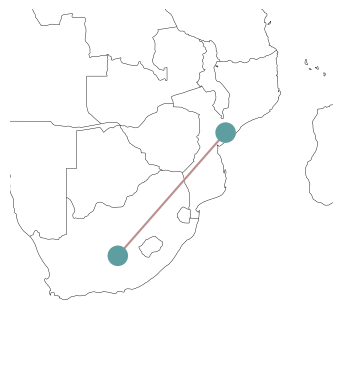
Since we have provided x and y coordinates for our buses, n.plot() will try to plot the network on a map by default. Of course, there’s an option to deactivate this behaviour:
n.plot(geomap=False)
{'nodes': {'Bus': <matplotlib.collections.PatchCollection at 0x7fdb357b7390>},
 'branches': {'Line': <matplotlib.collections.LineCollection at 0x7fdb357b74d0>},
 'flows': {}}
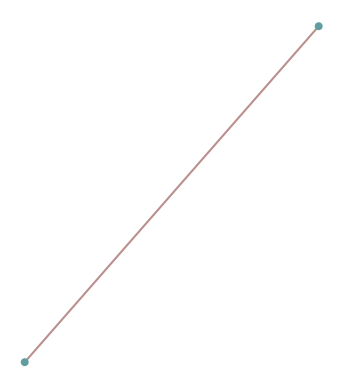
The n.plot() function has a variety of styling arguments to tweak the appearance of the buses, the lines and the map in the background:
n.plot(
    margin=1,
    bus_sizes=1,
    bus_colors="orange",
    bus_alpha=0.8,
    line_colors="orchid",
    line_widths=3,
    title="Test",
)
{'nodes': {'Bus': <matplotlib.collections.PatchCollection at 0x7fdb3566f9d0>},
 'branches': {'Line': <matplotlib.collections.LineCollection at 0x7fdb3566fb10>},
 'flows': {}}

We can use the bus_sizes argument of n.plot() to display the regional distribution of load. First, we calculate the total load per bus:
s = n.loads.groupby("bus").p_set.sum() / 1e4
s
bus
MZ    0.065
SA    4.200
Name: p_set, dtype: float64
The resulting pandas.Series we can pass to n.plot(bus_sizes=...):
n.plot(margin=1, bus_sizes=s)
{'nodes': {'Bus': <matplotlib.collections.PatchCollection at 0x7fdb356074d0>},
 'branches': {'Line': <matplotlib.collections.LineCollection at 0x7fdb35607610>},
 'flows': {}}
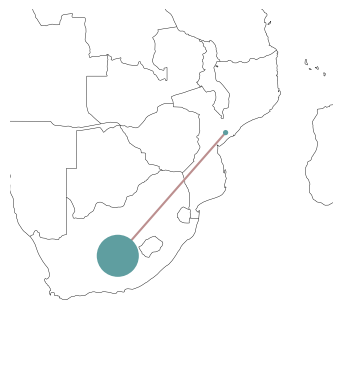
The important point here is, that s needs to have entries for all buses, i.e. its index needs to match n.buses.index.
The bus_sizes argument of n.plot() can be even more powerful. It can produce pie charts, e.g. for the mix of electricity generation at each bus.
The dispatch of each generator, we can find at:
n.generators_t.p.loc["now"]
name
MZ hydro     1150.0
SA coal     35000.0
SA wind      3000.0
SA gas       1500.0
SA oil       2000.0
Name: now, dtype: float64
If we group this by the bus and carrier…
n.generators.carrier
name
MZ hydro    hydro
SA coal      coal
SA wind      wind
SA gas        gas
SA oil        oil
Name: carrier, dtype: object
… we get a multi-indexed pandas.Series …
s = n.generators_t.p.loc["now"].groupby([n.generators.bus, n.generators.carrier]).sum()
s
bus  carrier
MZ   hydro       1150.0
SA   coal       35000.0
     gas         1500.0
     oil         2000.0
     wind        3000.0
Name: now, dtype: float64
… which we can pass to n.plot(bus_sizes=...):
n.plot(margin=1, bus_sizes=s / 3000)
{'nodes': {'Bus': <matplotlib.collections.PatchCollection at 0x7fdb35663110>},
 'branches': {'Line': <matplotlib.collections.LineCollection at 0x7fdb35663250>},
 'flows': {}}
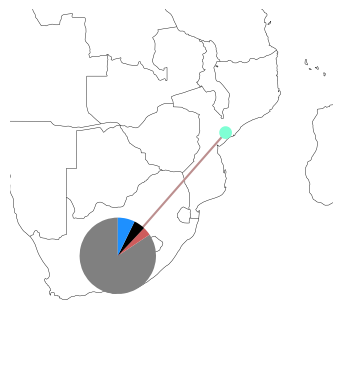
How does this magic work? The plotting function will look up the colors specified in n.carriers for each carrier and match it with the second index-level of s.
Modifying networks#
Modifying data of components in an existing PyPSA network is as easy as modifying the entries of a pandas.DataFrame. For instance, if we want to reduce the cross-border transmission capacity between South Africa and Mozambique, we’d run:
n.lines.loc["SA-MZ", "s_nom"] = 100
n.lines
| bus0 | bus1 | type | x | r | g | b | s_nom | s_nom_mod | s_nom_extendable | ... | v_ang_max | sub_network | x_pu | r_pu | g_pu | b_pu | x_pu_eff | r_pu_eff | s_nom_opt | v_nom | |
|---|---|---|---|---|---|---|---|---|---|---|---|---|---|---|---|---|---|---|---|---|---|
| name | |||||||||||||||||||||
| SA-MZ | SA | MZ | 1.0 | 1.0 | 0.0 | 0.0 | 100.0 | 0.0 | False | ... | inf | 0 | 0.000007 | 0.000007 | 0.0 | 0.0 | 0.000007 | 0.000007 | 500.0 | 380.0 |
1 rows × 33 columns
n.optimize(solver_name="highs")
You can see that the production of the hydro power plant was reduced and that of the gas power plant increased owing to the reduced transmission capacity.
n.generators_t.p
| name | MZ hydro | SA coal | SA wind | SA gas | SA oil |
|---|---|---|---|---|---|
| snapshot | |||||
| now | 750.0 | 35000.0 | 3000.0 | 1900.0 | 2000.0 |
Add a global constraints for emission limits#
In the example above, we happen to have some spare gas capacity with lower carbon intensity than the coal and oil generators. We could use this to lower the emissions of the system, but it will be more expensive. We can implement the limit of carbon dioxide emissions as a constraint.
This is achieved in PyPSA through Global Constraints which add constraints that apply to many components at once.
But first, we need to calculate the current level of emissions to set a sensible limit.
We can compute the emissions per generator (in tonnes of CO\(_2\)) in the following way.
where \( \rho\) is the specific emissions (tonnes/MWh thermal) and \(\eta\) is the conversion efficiency (MWh electric / MWh thermal) of the generator with dispatch \(g\) (MWh electric):
e = (
    n.generators_t.p
    / n.generators.efficiency
    * n.generators.carrier.map(n.carriers.co2_emissions)
)
e
| name | MZ hydro | SA coal | SA wind | SA gas | SA oil |
|---|---|---|---|---|---|
| snapshot | |||||
| now | 0.0 | 36060.606061 | 0.0 | 655.172414 | 1485.714286 |
Summed up, we get total emissions in tonnes:
e.sum().sum()
np.float64(38201.49276011344)
n.model
Linopy LP model
===============

Variables:
----------
 * Generator-p (snapshot, name)
 * Line-s (snapshot, name)

Constraints:
------------
 * Generator-fix-p-lower (snapshot, name)
 * Generator-fix-p-upper (snapshot, name)
 * Line-fix-s-lower (snapshot, name)
 * Line-fix-s-upper (snapshot, name)
 * Bus-nodal_balance (name, snapshot)

Status:
-------
ok
So, let’s say we want to reduce emissions by 10%:
n.add(
    "GlobalConstraint",
    "emission_limit",
    carrier_attribute="co2_emissions",
    sense="<=",
    constant=e.sum().sum() * 0.9,
)
n.optimize.create_model()
Linopy LP model
===============

Variables:
----------
 * Generator-p (snapshot, name)
 * Line-s (snapshot, name)

Constraints:
------------
 * Generator-fix-p-lower (snapshot, name)
 * Generator-fix-p-upper (snapshot, name)
 * Line-fix-s-lower (snapshot, name)
 * Line-fix-s-upper (snapshot, name)
 * Bus-nodal_balance (name, snapshot)
 * GlobalConstraint-emission_limit

Status:
-------
initialized
# let's check the new global constraint
n.model.constraints["GlobalConstraint-emission_limit"]
Constraint `GlobalConstraint-emission_limit`
--------------------------------------------
+1.03 Generator-p[now, SA coal] + 0.3448 Generator-p[now, SA gas] + 0.7429 Generator-p[now, SA oil] ≤ 34381.3434841021
n.optimize(solver_name="highs")
n.generators_t.p
| name | MZ hydro | SA coal | SA wind | SA gas | SA oil |
|---|---|---|---|---|---|
| snapshot | |||||
| now | 750.0 | 30156.761529 | 3000.0 | 8000.0 | 743.238471 |
n.generators_t.p / n.generators.p_nom
| name | MZ hydro | SA coal | SA wind | SA gas | SA oil |
|---|---|---|---|---|---|
| snapshot | |||||
| now | 0.625 | 0.861622 | 1.0 | 1.0 | 0.371619 |
n.global_constraints.mu
name
emission_limit   -392.771084
Name: mu, dtype: float64
Can we lower emissions even further? Say by another 5% points?
n.global_constraints.loc["emission_limit", "constant"] = 0.85
n.optimize(solver_name="highs")
No! Without any additional capacities, we have exhausted our options to reduce CO2 in that hour. The optimiser tells us that the problem is infeasible.
A slightly more realistic example#
Dispatch problem with German SciGRID network
SciGRID is a project that provides an open reference model of the European transmission network. The network comprises time series for loads and the availability of renewable generation at an hourly resolution for January 1, 2011 as well as approximate generation capacities in 2014. This dataset is a little out of date and only intended to demonstrate the capabilities of PyPSA.
n = pypsa.examples.scigrid_de()
INFO:pypsa.network.io:Retrieving network data from https://github.com/PyPSA/PyPSA/raw/v1.0.2/examples/networks/scigrid-de/scigrid-de.nc.
INFO:pypsa.network.io:New version 1.0.4 available! (Current: 1.0.2)
INFO:pypsa.network.io:Imported network 'SciGrid-DE' has buses, carriers, generators, lines, loads, storage_units, transformers
n.plot()
{'nodes': {'Bus': <matplotlib.collections.PatchCollection at 0x7fdb3408ae90>},
 'branches': {'Line': <matplotlib.collections.LineCollection at 0x7fdb3408afd0>,
  'Transformer': <matplotlib.collections.LineCollection at 0x7fdb3408b110>},
 'flows': {}}
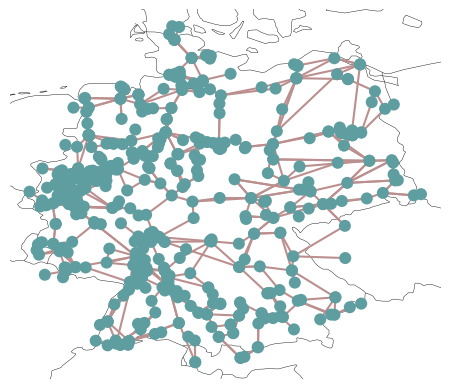
There are some infeasibilities without allowing extension. Moreover, to approximate so-called \(N-1\) security, we don’t allow any line to be loaded above 70% of their thermal rating. \(N-1\) security is a constraint that states that no single transmission line may be overloaded by the failure of another transmission line (e.g. through a tripped connection).
n.lines.s_max_pu = 0.7
n.lines.loc[["316", "527", "602"], "s_nom"] = 1715
Because this network includes time-varying data, now is the time to look at another attribute of n: n.snapshots. Snapshots is the PyPSA terminology for time steps. In most cases, they represent a particular hour. They can be a pandas.DatetimeIndex or any other list-like attributes.
n.snapshots
DatetimeIndex(['2011-01-01 00:00:00', '2011-01-01 01:00:00',
               '2011-01-01 02:00:00', '2011-01-01 03:00:00',
               '2011-01-01 04:00:00', '2011-01-01 05:00:00',
               '2011-01-01 06:00:00', '2011-01-01 07:00:00',
               '2011-01-01 08:00:00', '2011-01-01 09:00:00',
               '2011-01-01 10:00:00', '2011-01-01 11:00:00',
               '2011-01-01 12:00:00', '2011-01-01 13:00:00',
               '2011-01-01 14:00:00', '2011-01-01 15:00:00',
               '2011-01-01 16:00:00', '2011-01-01 17:00:00',
               '2011-01-01 18:00:00', '2011-01-01 19:00:00',
               '2011-01-01 20:00:00', '2011-01-01 21:00:00',
               '2011-01-01 22:00:00', '2011-01-01 23:00:00'],
              dtype='datetime64[ns]', name='snapshot', freq=None)
This index will match with any time-varying attributes of components:
n.loads_t.p_set.head()
| name | 1 | 3 | 4 | 6 | 7 | 8 | 9 | 11 | 14 | 16 | ... | 382_220kV | 384_220kV | 385_220kV | 391_220kV | 403_220kV | 404_220kV | 413_220kV | 421_220kV | 450_220kV | 458_220kV |
|---|---|---|---|---|---|---|---|---|---|---|---|---|---|---|---|---|---|---|---|---|---|
| snapshot | |||||||||||||||||||||
| 2011-01-01 00:00:00 | 231.716206 | 40.613618 | 66.790442 | 196.124424 | 147.804142 | 123.671946 | 83.637404 | 73.280624 | 175.260369 | 298.900165 | ... | 202.010114 | 222.695091 | 212.621816 | 77.570241 | 16.148970 | 0.092794 | 58.427056 | 67.013686 | 38.449243 | 66.752618 |
| 2011-01-01 01:00:00 | 221.822547 | 38.879526 | 63.938670 | 187.750439 | 141.493303 | 118.391487 | 80.066312 | 70.151738 | 167.777223 | 286.137932 | ... | 193.384825 | 213.186609 | 203.543436 | 74.258201 | 15.459452 | 0.088831 | 55.932378 | 64.152382 | 36.807564 | 63.902460 |
| 2011-01-01 02:00:00 | 213.127360 | 37.355494 | 61.432348 | 180.390839 | 135.946929 | 113.750678 | 76.927805 | 67.401871 | 161.200550 | 274.921657 | ... | 185.804364 | 204.829941 | 195.564769 | 71.347365 | 14.853460 | 0.085349 | 53.739893 | 61.637683 | 35.364750 | 61.397558 |
| 2011-01-01 03:00:00 | 207.997501 | 36.456367 | 59.953705 | 176.048930 | 132.674761 | 111.012761 | 75.076195 | 65.779545 | 157.320541 | 268.304442 | ... | 181.332154 | 199.899796 | 190.857632 | 69.630073 | 14.495945 | 0.083295 | 52.446403 | 60.154097 | 34.513540 | 59.919752 |
| 2011-01-01 04:00:00 | 200.194899 | 35.088781 | 57.704664 | 169.444814 | 127.697738 | 106.848344 | 72.259865 | 63.311960 | 151.418982 | 258.239549 | ... | 174.529848 | 192.400963 | 183.697997 | 67.018043 | 13.952159 | 0.080170 | 50.478984 | 57.897539 | 33.218835 | 57.671985 |
5 rows × 485 columns
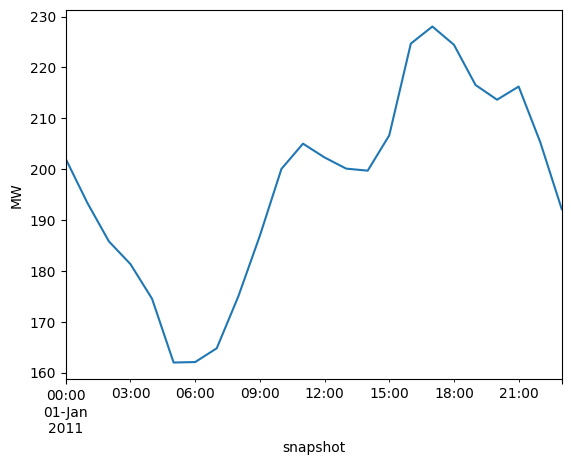
n.loads_t.p_set["382_220kV"].plot(ylabel="MW")
<Axes: xlabel='snapshot', ylabel='MW'>
Let’s inspect capacity factor time series for renewable generators:
n.generators_t.p_max_pu.T.groupby(n.generators.carrier).mean().T.plot(ylabel="p.u.")
<Axes: xlabel='snapshot', ylabel='p.u.'>

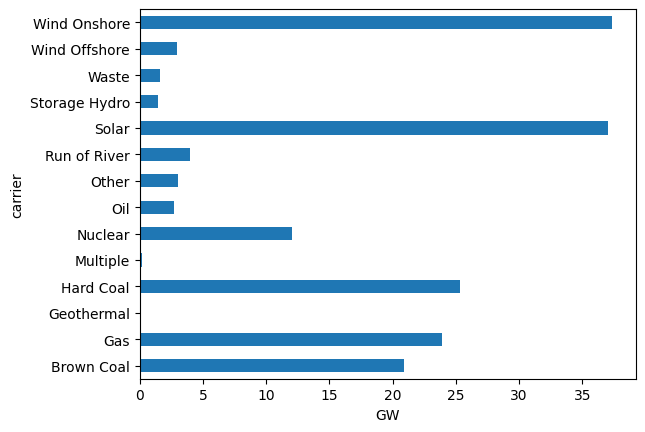
We can also inspect the total power plant capacities per technology…
n.generators.carrier.unique()
array(['Gas', 'Hard Coal', 'Run of River', 'Waste', 'Brown Coal', 'Oil',
       'Storage Hydro', 'Other', 'Multiple', 'Nuclear', 'Geothermal',
       'Wind Offshore', 'Wind Onshore', 'Solar'], dtype=object)
n.generators.groupby("carrier").p_nom.sum().div(1e3).plot.barh()
plt.xlabel("GW")
Text(0.5, 0, 'GW')
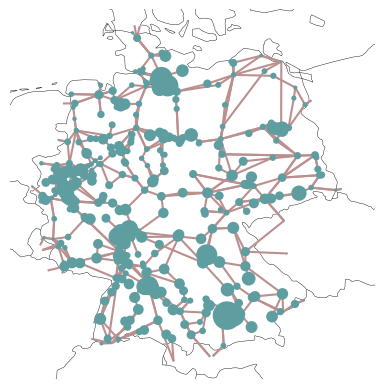
… and plot the regional distribution of loads…
load = n.loads_t.p_set.sum(axis=0).groupby(n.loads.bus).sum()
fig = plt.figure()
ax = plt.axes(projection=ccrs.EqualEarth())

n.plot(
    ax=ax,
    bus_sizes=load / 2e5,
)
{'nodes': {'Bus': <matplotlib.collections.PatchCollection at 0x7fdb2cd84f50>},
 'branches': {'Line': <matplotlib.collections.LineCollection at 0x7fdb2cd85090>,
  'Transformer': <matplotlib.collections.LineCollection at 0x7fdb2cd851d0>},
 'flows': {}}
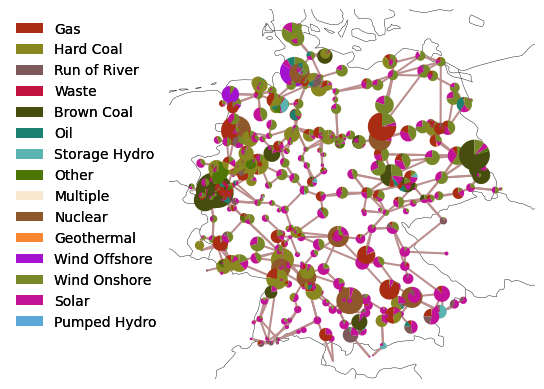
… and power plant capacities:
capacities = n.generators.groupby(["bus", "carrier"]).p_nom.sum()
For plotting we need to assign some colors to the technologies.
import random

carriers = list(n.generators.carrier.unique()) + list(n.storage_units.carrier.unique())
colors = ["#%06x" % random.randint(0, 0xFFFFFF) for _ in carriers]
n.add("Carrier", carriers, color=colors, overwrite=True)
Because we want to see which color represents which technology, we cann add a legend using the add_legend_patches function of PyPSA.
from pypsa.plot import add_legend_patches

fig = plt.figure()
ax = plt.axes(projection=ccrs.EqualEarth())

n.plot(
    ax=ax,
    bus_sizes=capacities / 2e4,
)
add_legend_patches(
    ax, colors, carriers, legend_kw=dict(frameon=False, bbox_to_anchor=(0, 1))
)
<matplotlib.legend.Legend at 0x7fdb2cd87b10>
This dataset also includes a few hydro storage units:
n.storage_units.head(3)
| bus | control | type | p_nom | p_nom_mod | p_nom_extendable | p_nom_min | p_nom_max | p_nom_set | p_min_pu | ... | state_of_charge_initial_per_period | state_of_charge_set | cyclic_state_of_charge | cyclic_state_of_charge_per_period | max_hours | efficiency_store | efficiency_dispatch | standing_loss | inflow | p_nom_opt | |
|---|---|---|---|---|---|---|---|---|---|---|---|---|---|---|---|---|---|---|---|---|---|
| name | |||||||||||||||||||||
| 100_220kV Pumped Hydro | 100_220kV | PQ | 144.5 | 0.0 | False | 0.0 | inf | NaN | -1.0 | ... | False | NaN | False | False | 6.0 | 0.95 | 0.95 | 0.0 | 0.0 | 0.0 | |
| 114 Pumped Hydro | 114 | PQ | 138.0 | 0.0 | False | 0.0 | inf | NaN | -1.0 | ... | False | NaN | False | False | 6.0 | 0.95 | 0.95 | 0.0 | 0.0 | 0.0 | |
| 121 Pumped Hydro | 121 | PQ | 238.0 | 0.0 | False | 0.0 | inf | NaN | -1.0 | ... | False | NaN | False | False | 6.0 | 0.95 | 0.95 | 0.0 | 0.0 | 0.0 |
3 rows × 36 columns
So let’s solve the electricity market simulation for January 1, 2011. It’ll take a short moment.
n.optimize(solver_name="highs")
Now, we can also plot model outputs. Let’s plot the hourly dispatch grouped by carrier:
supply_by_carrier = (
    n.statistics.supply(
        components=["Generator", "StorageUnit"], groupby="carrier", groupby_time=False
    )
    .div(1e3)  # MW -> GW
    .fillna(0)
)

df = supply_by_carrier.T
fig, ax = plt.subplots(figsize=(14.5, 5))
df.plot(kind="area", ax=ax, linewidth=0, cmap="tab20b")
ax.legend(ncol=5, loc="upper left", frameon=False)
ax.set_ylabel("GW")
ax.set_ylim(0, df.sum(axis=1).max() * 1.2)
fig.tight_layout()

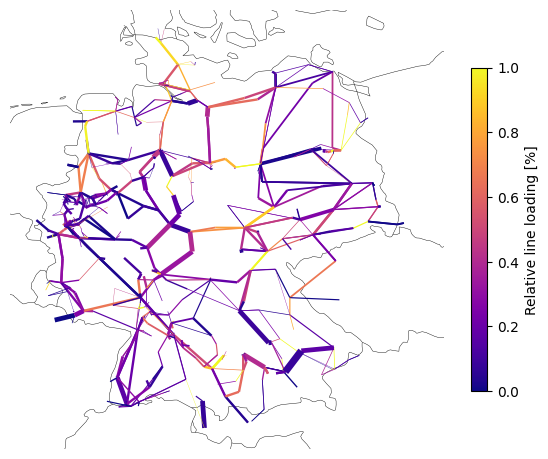
Or the calculated power flows on the network map:
line_loading = n.lines_t.p0.iloc[0].abs() / n.lines.s_nom / n.lines.s_max_pu * 100 # %
fig = plt.figure(figsize=(7, 7))
ax = plt.axes(projection=ccrs.EqualEarth())

n.plot(
    ax=ax,
    bus_sizes=0,
    line_colors=line_loading,
    line_cmap="plasma",
    line_widths=n.lines.s_nom / 1000,
)

plt.colorbar(
    plt.cm.ScalarMappable(cmap="plasma"),
    ax=ax,
    label="Relative line loading [%]",
    shrink=0.6,
)
<matplotlib.colorbar.Colorbar at 0x7fdb2df65be0>
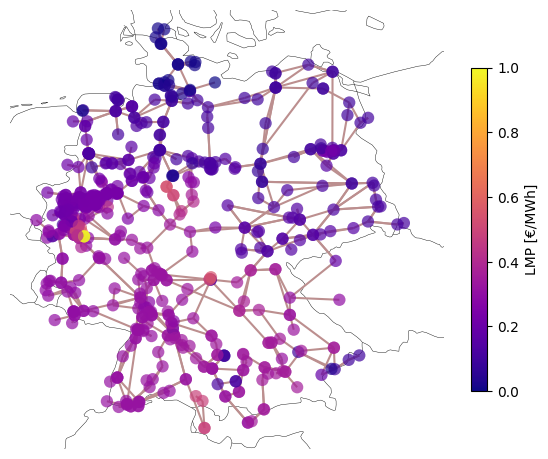
Or plot the locational marginal prices (LMPs):
fig = plt.figure(figsize=(7, 7))
ax = plt.axes(projection=ccrs.EqualEarth())

n.plot(
    ax=ax,
    bus_colors=n.buses_t.marginal_price.mean(),
    bus_cmap="plasma",
    bus_alpha=0.7,
)

plt.colorbar(
    plt.cm.ScalarMappable(cmap="plasma"),
    ax=ax,
    label="LMP [€/MWh]",
    shrink=0.6,
)
<matplotlib.colorbar.Colorbar at 0x7fdb2c5f7b10>
Data import and export#
Note
Documentation: https://pypsa.readthedocs.io/en/latest/import_export.html.
You may find yourself in a need to store PyPSA networks for later use. Or, maybe you want to import the genius PyPSA example that someone else uploaded to the web to explore.
PyPSA can be stored as netCDF (.nc) file or as a folder of CSV files.
netCDFfiles have the advantage that they take up less space thanCSVfiles and are faster to load.CSVmight be easier to use withExcel.
n.export_to_csv_folder("tmp")
WARNING:pypsa.network.io:Directory tmp does not exist, creating it
INFO:pypsa.network.io:Exported network 'SciGrid-DE' saved to 'tmp contains: sub_networks, loads, buses, lines, generators, transformers, storage_units, carriers
n.export_to_netcdf("tmp.nc")
INFO:pypsa.network.io:Exported network 'SciGrid-DE' saved to 'tmp.nc contains: sub_networks, loads, buses, lines, generators, transformers, storage_units, carriers
<xarray.Dataset> Size: 2MB
Dimensions:                            (snapshots: 24, sub_networks_i: 1,
                                        loads_i: 489, loads_t_p_set_i: 485,
                                        loads_t_p_i: 485, buses_i: 585,
                                        buses_t_p_i: 489, buses_t_v_ang_i: 585,
                                        buses_t_marginal_price_i: 584,
                                        lines_i: 852, lines_t_p0_i: 852,
                                        ...
                                        storage_units_i: 38,
                                        storage_units_t_p_i: 30,
                                        storage_units_t_p_dispatch_i: 30,
                                        storage_units_t_p_store_i: 30,
                                        storage_units_t_state_of_charge_i: 38,
                                        carriers_i: 16)
Coordinates: (12/24)
  * snapshots                          (snapshots) int64 192B 0 1 2 ... 21 22 23
  * sub_networks_i                     (sub_networks_i) object 8B '0'
  * loads_i                            (loads_i) object 4kB '1' ... '458_220kV'
  * loads_t_p_set_i                    (loads_t_p_set_i) object 4kB '1' ... '...
  * loads_t_p_i                        (loads_t_p_i) object 4kB '1' ... '458_...
  * buses_i                            (buses_i) object 5kB '1' ... '458_220kV'
    ...                                 ...
  * storage_units_i                    (storage_units_i) object 304B '100_220...
  * storage_units_t_p_i                (storage_units_t_p_i) object 240B '100...
  * storage_units_t_p_dispatch_i       (storage_units_t_p_dispatch_i) object 240B ...
  * storage_units_t_p_store_i          (storage_units_t_p_store_i) object 240B ...
  * storage_units_t_state_of_charge_i  (storage_units_t_state_of_charge_i) object 304B ...
  * carriers_i                         (carriers_i) object 128B 'AC' ... 'Pum...
Data variables: (12/90)
    snapshots_snapshot                 (snapshots) datetime64[ns] 192B 2011-0...
    snapshots_objective                (snapshots) float64 192B 1.0 1.0 ... 1.0
    snapshots_stores                   (snapshots) float64 192B 1.0 1.0 ... 1.0
    snapshots_generators               (snapshots) float64 192B 1.0 1.0 ... 1.0
    sub_networks_slack_bus             (sub_networks_i) object 8B '1'
    sub_networks_obj                   (sub_networks_i) float64 8B nan
    ...                                 ...
    storage_units_p_nom_opt            (storage_units_i) float64 304B 144.5 ....
    storage_units_t_p                  (snapshots, storage_units_t_p_i) float64 6kB ...
    storage_units_t_p_dispatch         (snapshots, storage_units_t_p_dispatch_i) float64 6kB ...
    storage_units_t_p_store            (snapshots, storage_units_t_p_store_i) float64 6kB ...
    storage_units_t_state_of_charge    (snapshots, storage_units_t_state_of_charge_i) float64 7kB ...
    carriers_color                     (carriers_i) object 128B '' ... '#5aa7d9'
Attributes:
    network__linearized_uc:       0
    network__multi_invest:        0
    network__objective:           9199288.04053995
    network__objective_constant:  0.0
    network_name:                 SciGrid-DE
    network_now:                  now
    network_pypsa_version:        1.0.2
    network_srid:                 4326
    crs:                          {"_crs": "GEOGCRS[\"WGS 84\",ENSEMBLE[\"Wor...
meta: {}n_nc = pypsa.Network("tmp.nc")
INFO:pypsa.network.io:New version 1.0.4 available! (Current: 1.0.2)
INFO:pypsa.network.io:Imported network 'SciGrid-DE' has buses, carriers, generators, lines, loads, storage_units, sub_networks, transformers
n_nc
PyPSA Network 'SciGrid-DE'
--------------------------
Components:
 - Bus: 585
 - Carrier: 16
 - Generator: 1423
 - Line: 852
 - Load: 489
 - StorageUnit: 38
 - SubNetwork: 1
 - Transformer: 96
Snapshots: 24